Human in the Loop AI Systems That Keep Work Accountable
Human in the loop AI systems help businesses automate repetitive work while keeping experienced people responsible for approvals, exceptions, and outcomes.
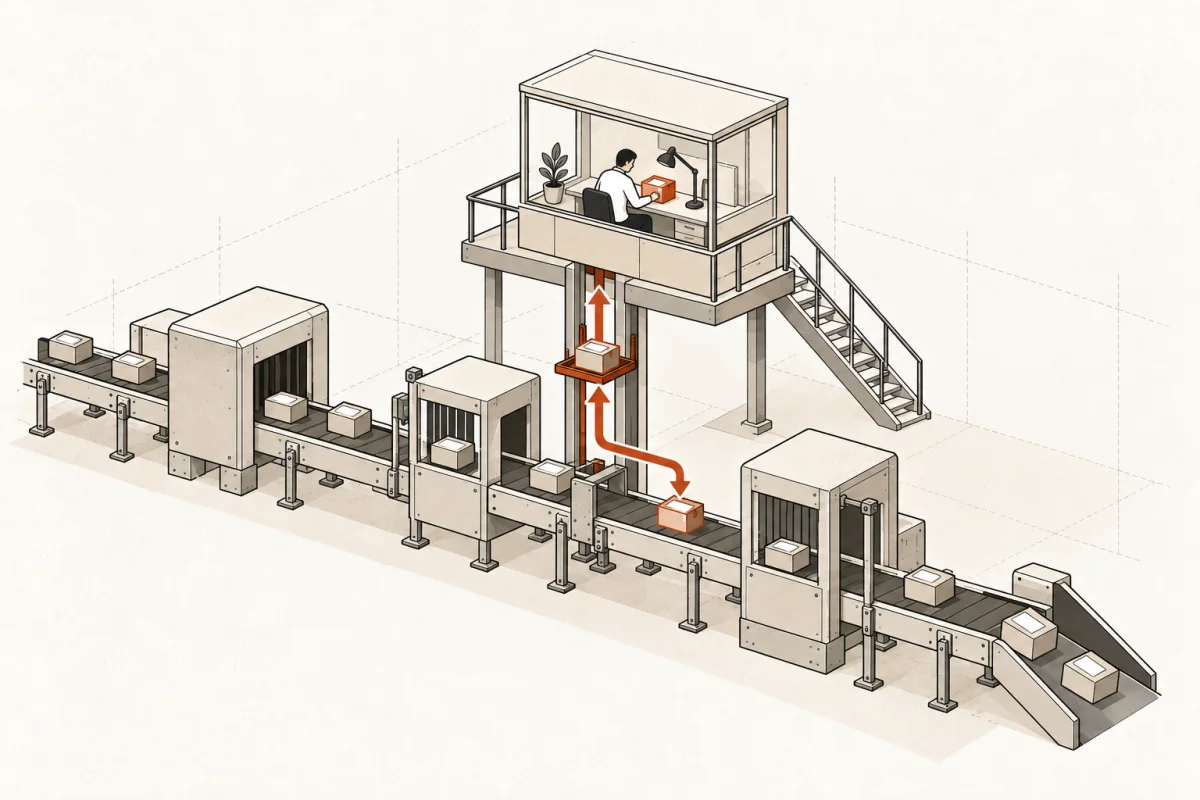
A claims manager should not discover an AI error after a customer receives the wrong answer. A construction owner should not learn that a bid went out with outdated numbers. Human in the loop AI systems are built for that reality: the machine handles preparation, routing, and routine analysis, while a qualified person owns the decision that affects money, customers, compliance, or reputation.
That distinction matters for small and mid-size businesses. Most do not need an autonomous bot making unsupervised decisions. They need fewer copy-and-paste tasks, faster response times, cleaner handoffs between software, and a clear answer to one question: who is accountable when the system gets it wrong?
What human in the loop AI systems actually do
A human in the loop system places a person at a defined control point in an AI-enabled workflow. The AI can read incoming documents, classify requests, draft a response, identify missing information, compare records, or recommend a next step. It cannot complete a designated action until the assigned person reviews it, changes it, or approves it.
This is not the same as putting a chatbot on a website and hoping staff notice problems. The control point must be designed into the process. It needs an owner, a decision standard, a record of what the AI recommended, and a path for handling exceptions.
Consider a professional-services firm processing new client inquiries. An AI agent can extract contact details, identify the service requested, check whether required intake fields are missing, prepare a reply, and place the opportunity in the CRM. A staff member reviews the proposed engagement category and pricing language before anything is sent. The work moves faster, but the firm does not hand client commitments to a model.
The same pattern applies across industries. An accounting firm can have AI organize source documents for review. A clinic can use it to prepare administrative follow-up while keeping clinical decisions with licensed staff. A contractor can use it to flag estimate discrepancies before an estimator approves the final number.
The right question is not whether AI can act alone
Business leaders are often given a false choice: automate everything or keep every task manual. Neither is usually sensible.
The practical question is which steps are repetitive enough for automation and consequential enough for review. A workflow may contain ten actions. Seven can run automatically, two may need a person only when an exception occurs, and one may always require approval. That is a useful system because it removes low-value work without removing human judgment.
Autonomy is appropriate when the cost of a mistake is low, the action is reversible, and the rules are stable. Updating a noncritical internal status field after a document is received may be safe to automate. Sending a discount, issuing a refund, changing a payroll record, advising a client, or approving a vendor payment is different. Those actions carry financial, legal, or relationship consequences.
The line also changes by business. A $50 replenishment order may be routine for an e-commerce company but material for a small retailer with tight cash flow. Human oversight should reflect the actual risk, not a generic AI policy copied from a large enterprise.
Where the human control point belongs
The strongest systems do not ask people to inspect every machine action. That simply moves the bottleneck from data entry to review. Instead, they use review where judgment adds value.
Before an external commitment
Put approval before the system sends a customer-facing message with pricing, legal language, a service promise, a medical or financial implication, or a sensitive answer. AI can draft quickly. Your team decides whether the draft is correct for that customer and situation.
When the data is uncertain or incomplete
AI systems should flag confidence problems, conflicting records, missing fields, and unusual requests. The system can continue routine work when information meets established rules, then pause when it does not. This keeps staff focused on decisions that need experience.
Before a high-impact transaction
Payments, refunds above a set threshold, contract changes, employee actions, inventory purchases, and production schedule changes should have explicit approval gates. The system should show the source data and recommendation, not just a button that says approve.
After the process, through sampling and audit
Not every workflow needs a person in real time. For lower-risk work, supervisors can review a sample of completed actions each week. This is useful for lead routing, internal knowledge retrieval, categorization, and routine data cleanup. Sampling catches drift without forcing constant manual review.
An approval button is not enough
Many AI projects fail here. A vendor adds a human approval screen, calls the system controlled, and leaves the operator with no context to make a sound decision.
A useful review queue shows what the AI did, why it did it, what information it used, and what action will follow approval. It should let the reviewer edit the output, reject it, escalate it, or send it back for missing information. If people cannot see the reasoning path and source material, they are not truly supervising the system. They are rubber-stamping it.
The system also needs to record overrides. When an experienced employee changes an AI recommendation, that correction is operational data. It can reveal a rule the workflow missed, a source system with poor data, or a category that needs a different approval path.
This is where explainability becomes practical rather than theoretical. Your team does not need a computer science lecture on model architecture. They need to know why a lead was scored as urgent, which invoice fields did not match, or which policy language supported a drafted response.
Define the operating rules before building
A working implementation starts with the workflow, not the model. Map the current process from trigger to outcome: what arrives, who touches it, which systems hold the data, where delays occur, and what can go wrong.
Then write the decision rules in plain language. For example: AI may draft responses to standard appointment questions. It must route billing disputes to a named person. It cannot provide clinical advice. It must request approval before offering a refund above $100. It must retain the original request and the approved response in the customer record.
These rules should cover four things: permissions, thresholds, exceptions, and ownership. Permissions define which tools and data the system can access. Thresholds state when automatic action stops. Exceptions describe what happens when the system is unsure or the request falls outside normal patterns. Ownership identifies the person or role responsible for the queue.
If no one owns the exception queue, the workflow is not finished. It is a demo waiting to create another inbox.
Measure human-in-the-loop systems by business results
A system is not successful because employees use it once or because it produces convincing text. Measure the operational result.
Start with baseline numbers: preparation hours per week, average lead response time, error rate, backlog age, approval turnaround, and cost per completed transaction. After launch, measure how much work the AI prepares, how often staff approve without changes, where overrides occur, and whether customer or compliance outcomes improve.
High approval rates are not automatically good. A 99% approval rate may mean the workflow is accurate, or it may mean reviewers are moving too quickly to inspect it. Pair approval rates with random quality checks and downstream error data.
Usage matters too. If staff bypass the system and return to spreadsheets, email, or personal notes, find out why. Usually the issue is not resistance to AI. It is a workflow that adds a step, hides needed context, or does not match the way the operation actually runs.
At Main & Machine, the objective is not to replace the people who understand the business. It is to give them a system that prepares work faster, connects the tools they already use, and makes the final call easier to inspect.
The trade-off: control can slow a process down
Human review introduces a cost. If every request needs executive approval, the company may remove one bottleneck only to create another. The answer is not to eliminate oversight. It is to tier it.
Set approval levels based on risk and value. Let routine, reversible actions proceed within clear rules. Route unusual cases to trained staff. Reserve senior review for high-dollar, regulated, or reputationally sensitive decisions. As the process proves itself over time, you may safely expand automation in narrow areas. Or you may decide a permanent review gate is worth the few extra minutes. Both can be sound choices.
The system should also be easy to pause. Staff need a clear way to stop automation when source data changes, a policy is updated, or the business sees behavior it does not trust. A kill switch is not pessimism. It is basic operational control.
Build for accountable speed
The best AI workflow does not make people disappear. It removes the clerical work that keeps experienced people from serving customers, solving exceptions, and making decisions that require judgment.
Start with one workflow where repetitive preparation is consuming real hours and the decision owner is already clear. Define the approval point, show reviewers the evidence, capture overrides, and measure the result for 30 to 90 days. When the control works in one process, you have a practical model for the next one - without gambling your customer relationships or your reputation on an opaque system.
Where this shows upWhat we actually build →