How to Automate Invoice Processing With AI
Learn how to automate invoice processing with AI while keeping approvals, exception handling, vendor data, and final payment decisions under clear control.
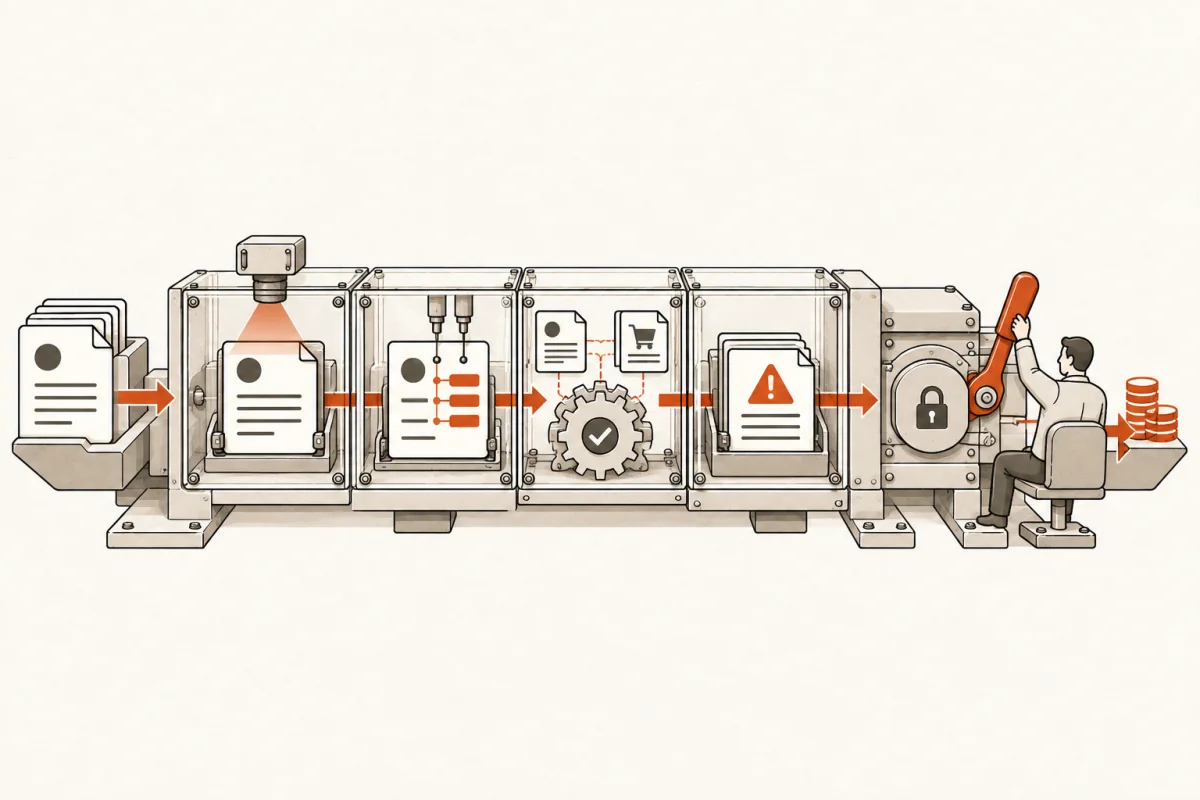
An invoice arrives in an inbox at 4:47 p.m. Someone downloads it, renames it, enters data into accounting software, hunts down a project manager for approval, and hopes nothing was keyed incorrectly. Multiply that by hundreds of invoices a month and the cost is not just labor. It is late fees, duplicate payments, unclear cash flow, frustrated vendors, and experienced staff spending their day on transcription.
To automate invoice processing with AI, start with the actual work your accounts payable team performs, not a generic document-reading demo. The goal is to remove repetitive handling while preserving human ownership of approvals, exceptions, and payment decisions.
Define the invoice workflow before you automate it
Invoice automation fails when a business treats every bill as if it follows the same path. It rarely does. A recurring software invoice may need no review beyond a spending threshold. A subcontractor invoice may require a purchase order match, job-cost coding, proof of work, and approval from a superintendent. A professional services bill may need a partner to review narrative charges before it is released.
Document the current path for invoices from arrival to payment. Identify where invoices enter, who reviews them, what information is manually entered, which systems hold the matching data, and what conditions stop payment. This is not paperwork for its own sake. It determines whether the automation will reduce work or simply move confusion into a new tool.
The useful question is: what decision is being made at each step, and what information does the decision-maker need? AI can classify a document, extract fields, compare records, and draft a recommendation. It should not invent approval authority or silently decide that a questionable invoice is valid.
The data an AI system should capture
At minimum, the system needs to identify the vendor, invoice number, invoice date, due date, line items, tax, total, payment terms, and supporting document references. For job-based or client-billed work, it may also need a project number, cost code, location, department, and customer.
Extraction alone is not the finish line. The value comes from placing that data in the right business context. An invoice for $18,400 from a known supplier means little until the system can check whether there is a purchase order, whether the amount exceeds the remaining commitment, and whether the bill belongs to the correct job.
Build the process around three lanes
A working invoice system routes bills into different lanes based on risk and confidence. This is more practical than demanding either full automation or full manual review.
The first lane is straight-through processing. These are predictable, low-risk invoices from approved vendors where key fields are extracted with high confidence and the invoice matches an approved purchase order or recurring billing rule. The system can prepare the bill in the accounting platform and route it according to predefined policy.
The second lane is review-required processing. The AI has extracted the invoice, found relevant records, and prepared the coding, but one person needs to confirm an amount, allocation, or service description. The reviewer should receive the invoice, the proposed entry, the matching records, and a clear reason for the recommendation in one place. Making staff jump across five systems defeats the point.
The third lane is exceptions. These include duplicate invoice numbers, unmatched vendors, missing purchase orders, unusual price changes, suspicious payment instructions, low-confidence data extraction, and invoices that exceed authority limits. Exceptions should be visible, assigned, and time-bound. An exception queue without ownership becomes another inbox.
This structure gives leaders a better control model. Routine work moves faster. Judgment-heavy work goes to the people who understand the business. High-risk items stop before they create a payment problem.
Connect AI to the systems that hold the truth
An invoice workflow is only as good as its connections. If vendor records live in one platform, purchase orders in another, job data in a third, and bills in a fourth, staff will keep copying data unless the system connects those sources.
For many small and mid-size businesses, the core stack includes email, a document storage location, accounting software, an expense or payment platform, and an operational system such as a CRM, ERP, practice-management tool, field-service platform, or construction management system. The AI layer should work across that stack rather than become another isolated destination for documents.
A practical system can monitor designated inboxes, collect attachments, read PDFs and images, create structured invoice records, search approved vendor and purchase-order data, then prepare bills in the accounting system. It can also send approval requests through the channels people already use, while maintaining a clear audit trail of what was received, what the system found, what changed, and who approved it.
The integration detail matters. If a bill is created in accounting software, determine whether it is a draft, a pending bill, or a payable item ready for payment. If the system updates a vendor record, decide who can authorize that change. If payment instructions differ from prior records, require verification outside the email thread. AI does not eliminate fraud controls. It makes disciplined controls easier to enforce.
Set controls before turning on automation
The wrong promise is "touchless AP." The right standard is controlled AP with less manual handling. Your system needs explicit rules for confidence thresholds, approval limits, vendor changes, data retention, and access permissions.
For example, a company might allow invoices under $500 from approved recurring vendors to be prepared automatically, while requiring a department lead to approve anything above that amount. A construction firm may require a three-way match for material invoices but use a different process for equipment rentals. A medical practice may need stricter controls around documents that contain patient information. It depends on the risk, the industry, and the systems involved.
Require the AI to show its work. A reviewer should be able to see the original invoice, the extracted values, the records used for matching, and the reason an item was flagged. If a person disagrees, they need a simple way to correct the record and override the recommendation. Those corrections should improve the workflow rules over time, not disappear into a black box.
Security also needs a plain answer. Define what invoice data is processed, where it is stored, which users can access it, and whether identifiers or documents leave your approved environment. Do not accept vague assurances when invoices contain bank details, account numbers, pricing, or protected information.
Measure the business case in hours and errors
Invoice automation should earn its place in the operation. Start with a baseline: monthly invoice volume, average minutes per invoice, percentage requiring follow-up, payment-error rate, early-payment discounts missed, and the age of the approval queue.
Suppose your team processes 800 invoices a month and spends an average of nine minutes receiving, entering, coding, and routing each one. That is 120 hours a month before follow-up work. If a controlled system returns half of that time, you recover 60 hours every month. The return becomes more meaningful when those hours go to vendor management, cash planning, project analysis, or work that directly serves customers.
Do not count every saved minute as a headcount reduction. In many businesses, the immediate gain is capacity and fewer bottlenecks. The financial return may come from avoiding an additional hire, capturing discounts, reducing duplicate payments, or closing the books faster. State the expected result in those terms before approving a build.
Roll it out in a controlled production plan
Start with a defined invoice category, vendor group, or department rather than every invoice in the company. Use real documents, real approval rules, and real accounting data. A pilot that only works on clean sample PDFs proves very little.
During the first stage, validate extraction accuracy, matching logic, coding recommendations, and exception handling. Next, run the system alongside the existing process long enough to compare results. Then enable production routing for the lowest-risk lane and expand only when the controls hold.
A serious implementation has named owners: an operations lead who defines the process, an accounting owner who approves financial rules, an IT or security owner who reviews access, and the staff members who will use the system every day. Main & Machine builds these systems as operating infrastructure, with defined scope, integrations, training, and human override controls instead of handing a team a strategy deck.
The best first target is not the most impressive use case. It is the invoice process where volume is high, rules are clear, data is available, and delays are costing the business money. Build that one well. When your team can see exactly why an invoice moved, why it stopped, and who owns the next decision, automation stops being a gamble and starts becoming dependable back-office capacity.
Where this shows upWhat we actually build →