Integrate CRM With AI Automation That Works
Learn how to integrate CRM with AI automation without creating bad data, black-box decisions, or brittle workflows that your team cannot manage later.
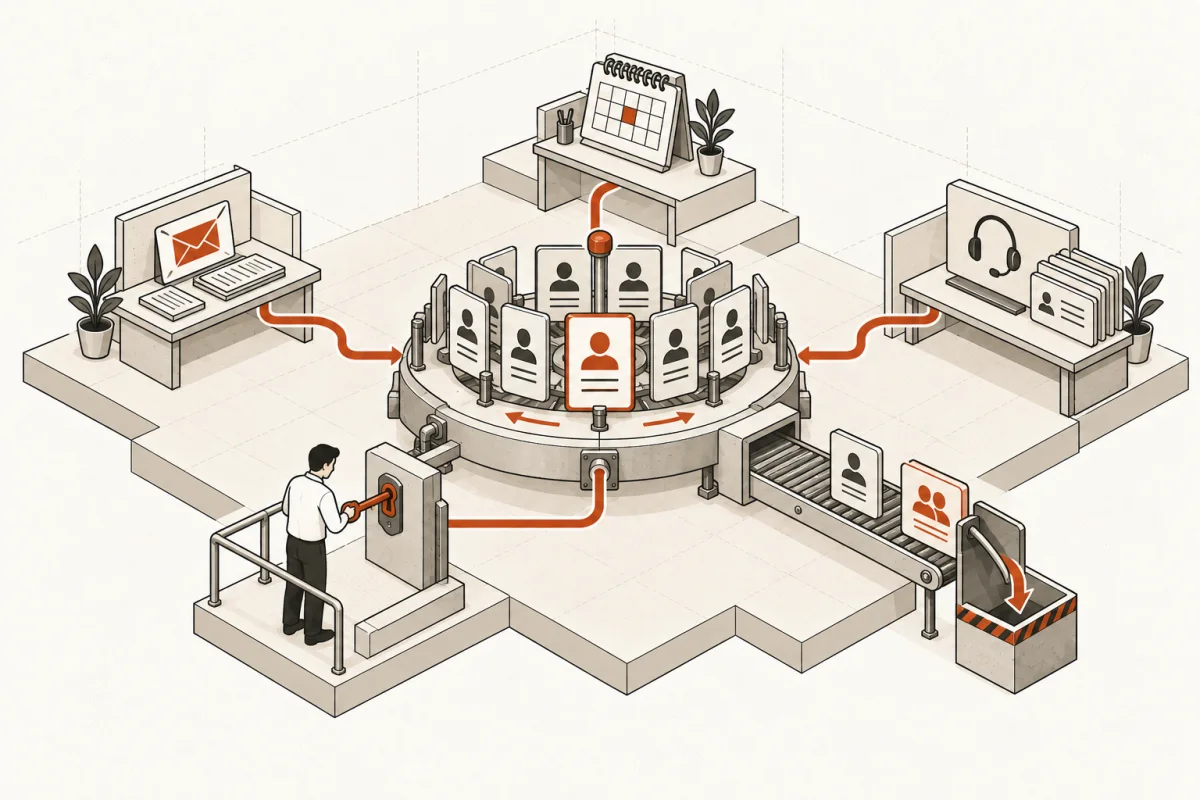
A lead submits a form at 9:07 a.m. The sales rep sees it at 3:30 p.m., after copying notes from email into the CRM, checking whether the company already exists, and asking operations for pricing history. That delay is not a sales problem. It is a systems problem.
To integrate CRM with AI automation properly, you need more than an AI chatbot connected to a contact list. You need defined business rules, clean data, a clear handoff to people, and automation that can be inspected when something goes wrong. Otherwise, you trade copy-and-paste work for faster, less visible mistakes.
Start with the workflow cost, not the AI tool
Most businesses begin with a tool question: Can our CRM connect to an AI agent? Usually, yes. That is not the useful question.
Start by measuring where the CRM workflow is costing you time, revenue, or consistency. For a service firm, the issue may be leads that wait too long for qualification. For a construction company, it may be estimates built from incomplete job notes. For an insurance agency, it may be account managers rekeying call notes, emails, and renewal information across several systems.
Write down the current path from trigger to outcome. Include the systems involved, the person responsible at each step, the information required, and the exceptions. If a process cannot be explained on one page, it is not ready for blind automation.
The best early projects are repetitive, high-volume, and rules-based enough to verify. Lead intake, call-note summaries, contact enrichment, meeting follow-up drafts, document classification, and task routing often qualify. Final pricing, legal interpretation, underwriting, hiring decisions, and clinical judgment generally require a human approval point.
That distinction matters. AI can prepare, classify, recommend, and draft. Your people still own the decision.
Define what the CRM remains responsible for
Your CRM should remain the operational record of customer relationships. It should not become a dumping ground for every AI-generated thought, raw transcript, or unverified web result.
Before building anything, establish which fields are authoritative. For example, a CRM may be the source of truth for account owner, deal stage, customer status, and approved contact details. Your accounting platform may own invoices and payment status. A project platform may own delivery milestones. The AI system can read across these sources, but it should only write back to fields it is authorized to update.
This prevents a common failure: an AI workflow creates duplicate companies, overwrites a valid phone number, or advances a deal based on language that sounded positive but did not meet your actual sales criteria.
A practical rule is simple: separate facts, recommendations, and drafts. Facts can be written automatically when they come from a trusted source and pass validation. Recommendations should be visible to a responsible employee. Drafts should never send externally without the approval level your risk warrants.
Build the data layer before the agent layer
AI does not repair a CRM that has inconsistent fields, duplicates, missing ownership, and five different meanings for “qualified lead.” It will reproduce that confusion at machine speed.
Normalize the data that matters to the workflow. Standardize lead sources, lifecycle stages, service lines, territories, and account ownership. Define required fields at meaningful handoff points. Create duplicate rules. Archive fields no one uses instead of asking staff to maintain them forever.
Then decide how the systems will exchange information. Some integrations can run directly through your CRM and core software. Others need an integration layer that maps fields, logs events, handles retries, and alerts someone when a connection fails. The right choice depends on volume, security requirements, the number of systems involved, and how expensive an error would be.
For a low-risk workflow, a direct connection may be enough. For a business where one incorrect update affects billing, compliance, or customer commitments, you need stronger controls: validation rules, approval queues, audit logs, and a way to reverse changes.
Integrate CRM with AI automation through controlled pilots
Do not connect every workflow at once. Pick one process with a measurable baseline and run it as a controlled production pilot.
Define the trigger, inputs, system actions, human review step, output, and failure path. If the AI cannot classify a request with sufficient confidence, what happens? If the CRM record is incomplete, does the workflow stop, create a task, or ask a coordinator for clarification? If a customer record already exists, which fields can be updated?
These are operating questions, not technical footnotes. They decide whether staff trust the system.
Measure results against the prior process. Useful metrics include lead response time, percent of records completed correctly, time spent preparing follow-ups, number of manual handoffs, conversion by source, and exception rate. Track weekly use as well. A workflow that saves time in a demo but gets bypassed by the team has no business value.
Run the pilot long enough to encounter normal messiness: duplicate contacts, unusual requests, employees on vacation, incomplete forms, and system outages. Then adjust the workflow before expanding it.
Make security and permissions part of the scope
A CRM integration can expose customer data to more systems than your team realizes. That requires specific answers before deployment: what information leaves the CRM, where it is processed, who can view it, how long it is retained, and whether it is used to train a third-party model.
Use the minimum data necessary for each automation. An agent drafting a follow-up may need deal notes and service details, but not payroll records or unrelated customer files. Limit permissions by role and system function. Maintain logs of records read, changes proposed, changes approved, and changes written.
Regulated businesses need additional design work. A law firm, healthcare provider, financial advisor, or insurance business may need redaction, restricted data zones, review requirements, and vendor controls that go beyond a standard CRM connector. The correct design depends on the data and your obligations. “The tool says it is secure” is not a control plan.
Budget for ownership after launch
CRM automation is not a one-time installation. Sales processes change. New fields appear. Team members alter stages. A software vendor updates an API. Prompts and rules need review when results drift.
Assign a business owner for each workflow, not just an IT contact. That owner should know the intended outcome, review exception reports, approve material changes, and decide when the process no longer matches how the company works.
Technical support still matters, but operational ownership is what keeps a useful system useful. At Main & Machine, that means building explainable workflows with visible rules, approval steps, and documented handoffs rather than handing over a black box and hoping staff adapts.
What a working first deployment looks like
A credible first deployment is specific. It might take inbound website leads, match them against CRM records, summarize the request, flag missing qualification details, route the record to the correct owner, create a task with a response deadline, and draft a reply for review. Every action is logged. A person can correct the record, override the routing, or stop the workflow.
That is materially different from asking an AI assistant to “manage our leads.” The first approach has a defined scope, measurable outcome, and accountable owner. The second is a vague promise that becomes difficult to test and expensive to repair.
Build the first system around one costly delay your team can name without opening a slide deck. When people can see that the CRM is cleaner, response time is shorter, and no one lost control of a customer decision, you have earned the right to automate the next workflow.
Where this shows upWhat we actually build →