AI Workflow Automation for Operations That Works
AI workflow automation for operations cuts repetitive work, connects business systems, and keeps people accountable for the decisions that matter most.
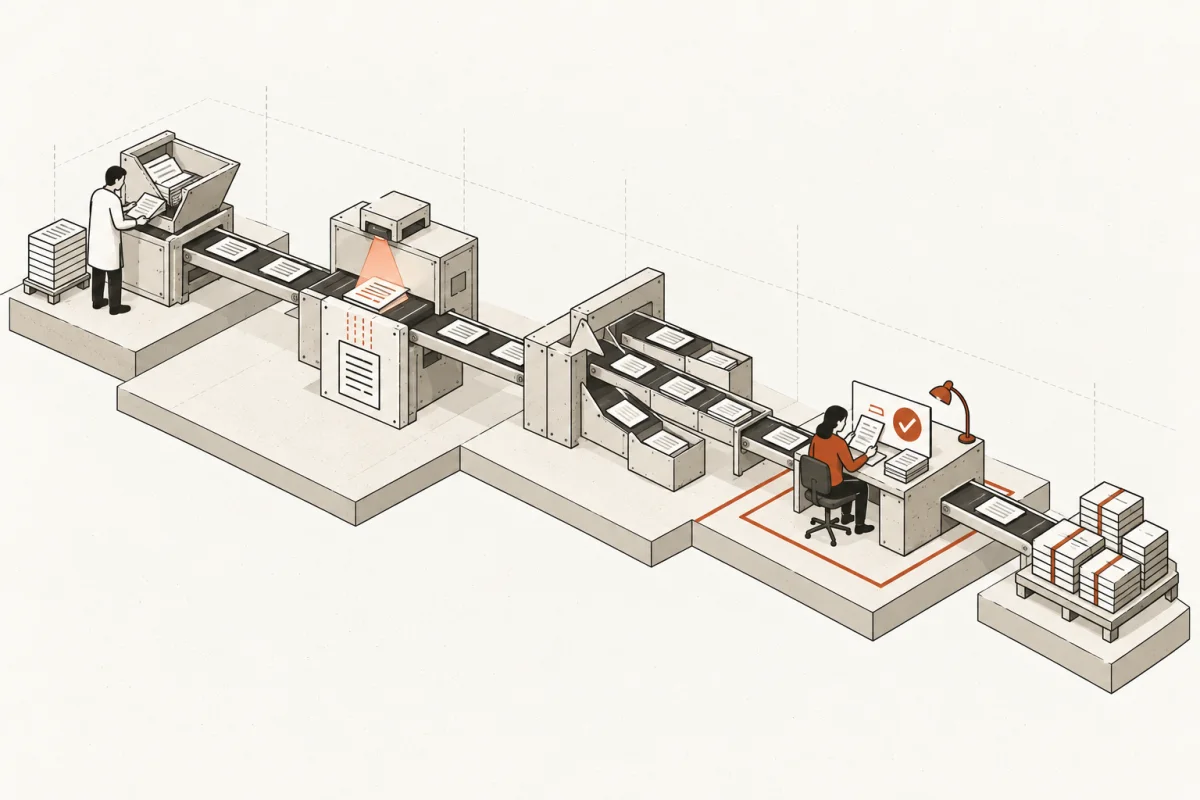
A customer inquiry lands in a shared inbox at 8:12 a.m. By noon, it has been copied into a CRM, forwarded to two people, entered into a spreadsheet, and still has not received a useful response. That is the kind of operational drag AI workflow automation for operations is built to remove. The goal is not to add a chatbot or produce a clever demo. The goal is to make the work move faster, with fewer handoffs and a clear person responsible for the decision.
For a small or mid-size business, the value usually sits in ordinary work: intake, scheduling, document collection, follow-up, status updates, approvals, reporting, and exception handling. These workflows consume time precisely because they cross systems and require context. AI can help, but only when it is designed around the actual process, the actual data, and the actual people who own the outcome.
What AI Workflow Automation for Operations Actually Means
Traditional automation follows fixed rules. When a form is submitted, create a record. When an invoice is paid, update the accounting system. Those rules remain useful, especially for predictable tasks.
AI adds a different capability. It can read unstructured information, classify requests, summarize documents, draft a response, pull relevant context from approved business systems, and route work based on what it finds. A well-built operational system combines both. Rules handle the predictable steps. AI handles the judgment-adjacent preparation work. A human retains authority over decisions with financial, legal, safety, customer, or reputational consequences.
Consider a construction company processing change requests. A basic automation can save an attachment and notify a project manager. An AI-enabled workflow can also extract the scope, identify missing information, compare the request against the project record, prepare a response draft, and flag the request for the right reviewer. It should not approve a change order on its own. That is not a technology limitation. It is an accountability requirement.
The same pattern applies in law firms, accounting practices, insurance agencies, clinics, retail operations, and professional services. The useful system does preparation at scale while experienced people make the call.
Start With Cost, Not With an AI Tool
Most stalled AI projects begin with the wrong question: Which platform should we buy? The better question is: Which recurring workflow is costing us the most time, delay, errors, or lost revenue?
A good first assessment traces a workflow from trigger to completion. It identifies where information enters, where staff rekey data, where someone waits for an answer, which systems hold the record, and where exceptions pile up. It also identifies the cost of leaving the workflow alone.
A workflow does not need hundreds of hours per month to justify automation. A lead-response process that loses five qualified opportunities each month may matter more than a high-volume internal task. Likewise, a workflow with modest labor cost can be a priority if an error creates compliance exposure or frustrates customers.
Use a plain calculation. Add the monthly hours spent on repetitive preparation, multiply by the loaded hourly cost, then add a conservative estimate of missed revenue, rework, or delayed cash collection. That produces a baseline. The system should be measured against that number after it goes live.
Do not assume the most visible task is the best candidate. The right first workflow is usually high-frequency, cross-functional, and painful enough that staff will adopt a better process. It also needs a reasonably stable source of data. Automating a process that changes every week is possible, but it is rarely the smartest place to start.
Build the Workflow Around Exceptions
The happy path is easy. A customer sends a complete request, the data matches, the required fields are present, and the right employee is available. Real operations are built on everything that goes wrong after that.
A working AI workflow needs a defined path for incomplete requests, conflicting records, low-confidence outputs, missing approvals, unusual dollar amounts, and sensitive information. If the system cannot confidently proceed, it should stop, explain what it found, and send the item to a person with enough context to resolve it.
That is the difference between automation that saves time and automation that creates cleanup work. A vague instruction such as "use AI to handle intake" is not a process design. A usable specification states what triggers the workflow, what data it may access, what it produces, where it writes results, when it escalates, and who has final authority.
For most operational systems, four controls are non-negotiable:
- A named human owner for the workflow and its exceptions.
- Clear approval gates for decisions that commit money, create obligations, or affect a customer materially.
- An audit trail showing what the system received, what it generated, and what action was taken.
- Permission boundaries that limit access to the data each role and agent actually needs.
These controls are not bureaucracy. They are what make the system usable in a real business where someone must explain a decision later.
Connect Existing Systems Before Adding New Ones
Many operations problems are not caused by a lack of software. They come from disconnected software. The CRM has customer history. The phone system has call activity. Accounting has payment status. A shared drive holds contracts. Staff become the integration layer, copying information between each one.
AI should reduce that manual relay work, not create another isolated destination for it. In practical terms, that means defining a system of record for each category of information and deciding which systems may read, write, or approve changes.
For example, a service business may use its CRM as the customer record, its scheduling tool as the appointment record, and its accounting platform as the payment record. An AI assistant can assemble a daily service brief from all three, identify customers who need follow-up, and draft outreach for review. But it should not create duplicate customer records or quietly alter payment data because a text field looked similar.
Integration work can be less glamorous than a polished AI interface. It is also where a large share of the operational value comes from. When data is connected, staff stop hunting for context and start acting on it.
Measure Production Use, Not Pilot Activity
A pilot can look successful because people enjoy testing it. Production is different. It must work on busy Mondays, with incomplete data, during staff turnover, and when the person who championed the project is on vacation.
The measures that matter are operational: turnaround time, preparation hours returned, error rate, time to first response, backlog age, completion rate, and weekly adoption by the people expected to use the system. Financial measures matter too, including labor capacity gained, faster collections, reduced rework, and conversion improvements.
Set the baseline before the build. Then review results at 30, 60, and 90 days. If usage is low, do not blame the staff first. Check whether the workflow fits their daily work, whether outputs are trustworthy, whether escalation is easy, and whether the system requires more steps than the process it replaced.
A system that employees work around is not deployed, regardless of how impressive its technology may be.
Choose Scope That Can Reach Production
The first build should be narrow enough to deploy and meaningful enough to matter. A common mistake is trying to automate every department at once. Another is choosing a tiny task that cannot produce visible value.
A sensible implementation sequence is to document the current process, confirm data access and security boundaries, build the workflow with human review points, test it against real exceptions, train the people who will use it, and monitor it after launch. The timeline depends on the number of systems, data quality, and approval requirements. A contained workflow can move quickly. A multi-department back-office system needs more design and governance.
Fixed scope and written acceptance criteria reduce surprises. Before work begins, the business should know what the system will do, what it will not do, which tools are included, who provides access, and what production-ready means. If a vendor cannot state those limits plainly, the project is not ready to price or build.
Main & Machine approaches this as operational infrastructure: identify the highest-cost workflows, build the connected system, and keep human judgment visible where it belongs.
The useful next question is not whether your business should use AI. It is which recurring piece of work your best people should no longer have to chase, copy, and reconstruct by hand.
Where this shows upWhat we actually build →