Operational AI: Systems That Actually Run Work
Operational AI turns repetitive business work into accountable systems that connect your tools, speed decisions, and keep people in control every day.
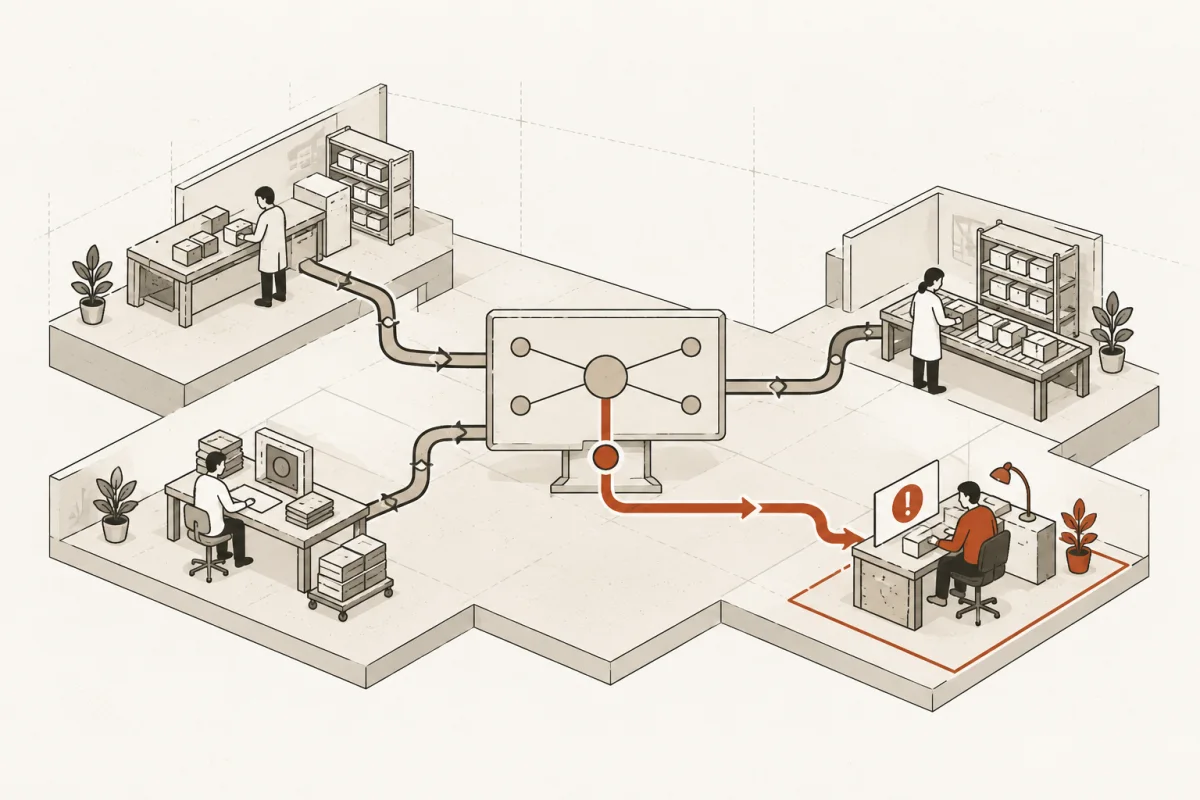
A lead arrives after hours. An employee copies the details into a CRM the next morning, checks another system for availability, drafts a reply, and asks a manager whether the prospect fits. By the time anyone responds, the buyer may have moved on. Operational AI is built for this kind of work: the repeatable, cross-system activity that costs time, creates delays, and makes good people spend their day moving information around.
It is not a chatbot pasted onto a website. It is not a slide deck explaining future possibilities. It is a working system inside the business, with defined inputs, permissions, actions, approvals, and a measurable result.
What Operational AI Means in a Real Business
Operational AI uses AI inside the workflows that run the company. It reads and organizes information, applies defined business rules, drafts or routes work, updates the right systems, and sends exceptions to a person who can make the final call.
For a construction company, that may mean extracting job details from incoming plans, preparing a bid package, and flagging missing scope before an estimator spends an hour reviewing it. For an accounting firm, it may mean collecting client documents, identifying gaps, assigning follow-up tasks, and preparing a clean review file. For a medical or wellness practice, it may mean handling intake, confirming eligibility information, and routing unusual cases to trained staff.
The AI is only one part of the system. The operational value comes from connecting it to the software, data, rules, and people already responsible for the process. A useful build may include a CRM, inbox, scheduling platform, document storage, accounting software, internal database, and approval queue. If those pieces remain disconnected, employees still become the integration layer.
That is the cost most businesses underestimate. The problem is rarely one large task. It is hundreds of small handoffs: copying an address, searching for an attachment, checking status in another application, asking the same qualifying questions, and rebuilding context before a decision can happen.
The Difference Between AI Activity and Business Output
Many companies have experimented with generative AI. Staff use it to draft emails, summarize meetings, or brainstorm content. Those uses can be helpful, but they do not automatically change operations.
Operational AI starts with a business outcome and works backward. The question is not, "Where can we use AI?" It is, "Which workflow is expensive, slow, error-prone, or difficult to scale, and what must change?"
A serious project defines the baseline before the build begins. That can include lead response time, number of manual touches per request, rework rate, time to prepare a file, backlog volume, cost per transaction, or percentage of work completed within a service-level target. Without a baseline, a team may like the new tool without being able to prove it earned its place.
The strongest use cases tend to have four traits:
- The work happens often enough to matter.
- Information comes from more than one place.
- The process follows recognizable rules, even when exceptions exist.
- A person can review or approve higher-risk decisions.
A workflow does not need to be perfectly standardized before automation begins. It does need an owner who can explain what good work looks like, which exceptions matter, and where human judgment is non-negotiable.
Where Operational AI Produces a Real Return
Start with the three highest-cost workflows, not the three most exciting ideas. In many small and mid-size businesses, those workflows sit in lead handling, client onboarding, document processing, service coordination, internal reporting, billing follow-up, or recurring account management.
Consider a professional-services firm that receives 60 qualified inquiries each month. If each inquiry takes 25 minutes to review, route, research, and respond to, that is 25 staff hours before the real sales conversation begins. An operational AI system can collect the required facts, score the inquiry against defined criteria, create the CRM record, schedule the right follow-up, and prepare a brief for the accountable salesperson. The salesperson still decides whether to take the engagement. They simply receive a prepared case instead of a scattered inbox thread.
The financial return comes from more than labor savings. Faster response can improve conversion. Consistent intake can reduce bad-fit clients. Better records can lower rework. Managers get fewer interruptions for routine questions and more time for the decisions that actually require their experience.
The math should be plain. If a system returns 20 hours per week and the loaded cost of that work is $45 per hour, the recoverable capacity is roughly $46,800 per year. That does not mean every dollar becomes cash savings. In a growing business, it may mean serving more customers without another hire. In a strained operation, it may mean less overtime, fewer dropped balls, and less burnout. The right model depends on the business.
Build Operational AI Around Control, Not Hype
The fastest way to create a liability is to let an AI system make unrestricted decisions with unclear data and no owner. The answer is not to avoid automation. The answer is to set boundaries before deployment.
A properly designed system separates low-risk actions from high-impact judgment. It can draft a response, classify an inbound request, prepare a recommendation, or identify a missing document. It should not approve a loan, issue legal advice, change a price outside approved rules, or make a clinical determination without the required human review.
Every build needs clear answers to practical questions. What data may the system access? What information must remain inside the organization? Which actions can happen automatically? Which actions require approval? How is an error corrected? Who owns the process after launch?
Explainability matters here. A manager should be able to see why a request was routed, what source information informed a summary, and what rule caused an exception. If the team cannot inspect the decision path, it cannot responsibly manage the system.
This is especially relevant in regulated or sensitive environments. A healthcare provider, law practice, insurance agency, and financial advisor may have different privacy, recordkeeping, and disclosure requirements. There is no universal configuration that solves every risk. The design has to match the data, the workflow, and the organization’s obligations.
A Practical Implementation Sequence
Operational AI should be deployed in a sequence that protects the business from expensive ambiguity.
Map the existing workflow
Document what actually happens, not what the procedure manual says should happen. Identify the trigger, the systems involved, the handoffs, the decisions, the exceptions, and the point where work gets stuck. Talk to the people doing the work. They know where the process breaks.
Set the scope and success measures
Choose a defined workflow with a named owner. Set the target result, such as cutting intake preparation from 30 minutes to 10, responding to qualified leads within five minutes, or reducing missing-document follow-up by 40 percent. Fixed scope is not bureaucracy. It keeps a useful project from turning into a vague technology program.
Connect data and build the working path
The system must interact with the tools people already use. That may require integrations, a structured data layer, permission controls, and a queue for approvals. A polished interface is secondary if the underlying records are unreliable or the workflow cannot update the source system.
Test exceptions before launch
Do not test only the clean examples. Use incomplete forms, duplicate records, unclear customer requests, conflicting data, unusual file formats, and cases that require escalation. The edge cases tell you whether the system can operate in the real business.
Train, measure, and improve
Staff adoption is part of the implementation, not an afterthought. Team members need to know what the system does, when to override it, and where to report failures. Review weekly use, error patterns, turnaround time, and the actual hours returned. If the system is not being used, the problem may be workflow fit, trust, training, or poor integration.
Main & Machine approaches this work as an implementation problem: identify the costly workflow, build the system around it, and keep people accountable for the final judgment.
When Operational AI Is the Wrong First Move
AI is not the cure for a broken process with no agreed owner. If a company cannot decide who approves a request, which pricing rules apply, or where the current customer record lives, adding AI can make confusion happen faster.
Sometimes the right first step is simpler: clean up the CRM, standardize intake fields, remove duplicate tools, define service categories, or centralize documents. Those improvements are not a failure of ambition. They are the foundation that makes automation reliable.
It also may not make sense to automate work that occurs only a few times a year, changes radically each time, or depends almost entirely on nuanced human relationship management. In those cases, AI may still help prepare information, but the case for a full workflow build is weaker.
The standard is straightforward: operational AI should make a measurable part of the business run better without making accountability harder to locate. Start where repetitive work is already costing time, give the system clear boundaries, and keep experienced people in charge when the decision carries real consequence.
Where this shows upWhat we actually build →